
Octopus Saving Sessions
Esta página aún no está disponible en tu idioma.
Introduction
Section titled “Introduction”Octopus Energy Saving Sessions reward Octoplus members for shifting when they use electricity. Netzero can configure the Powerwall automatically for two kinds of sessions:
- Weekend Happy Hours: free electricity during an hour you book with Octopus. Netzero charges the Powerwall from the grid for the hour.
- Power Down sessions: Octopoints for using less electricity than usual. Netzero exports stored Powerwall energy to the grid for the session.
Netzero acts only on the sessions you have joined or booked with Octopus. Joining and booking stay with you, in the Octopus app or from the Octopus invitation emails.
- Join Octoplus and sign up for Saving Sessions with Octopus.
- In Netzero, go to Settings > Utility Rate Plan.
- Enter your Octopus API key from your Octopus account; it starts with sk_live.
- Enter your Octopus Energy account number from bills, emails, or the Octopus app, e.g. A-12A34A99.
- Switch on Weekend Happy Hours, Power Down sessions, or both.
- Optionally enable Use Backup Mode to charge Powerwall faster under Weekend Happy Hours. See Backup Mode for details.
- Optionally enable Keep a higher backup reserve under Power Down sessions, and set Backup reserve during session (30% by default). See Higher backup reserve during the session.
- Enable push and/or email notifications in Settings > Notifications to get notified when a session starts and ends. Make sure the Automations notify only when failing toggle is disabled.
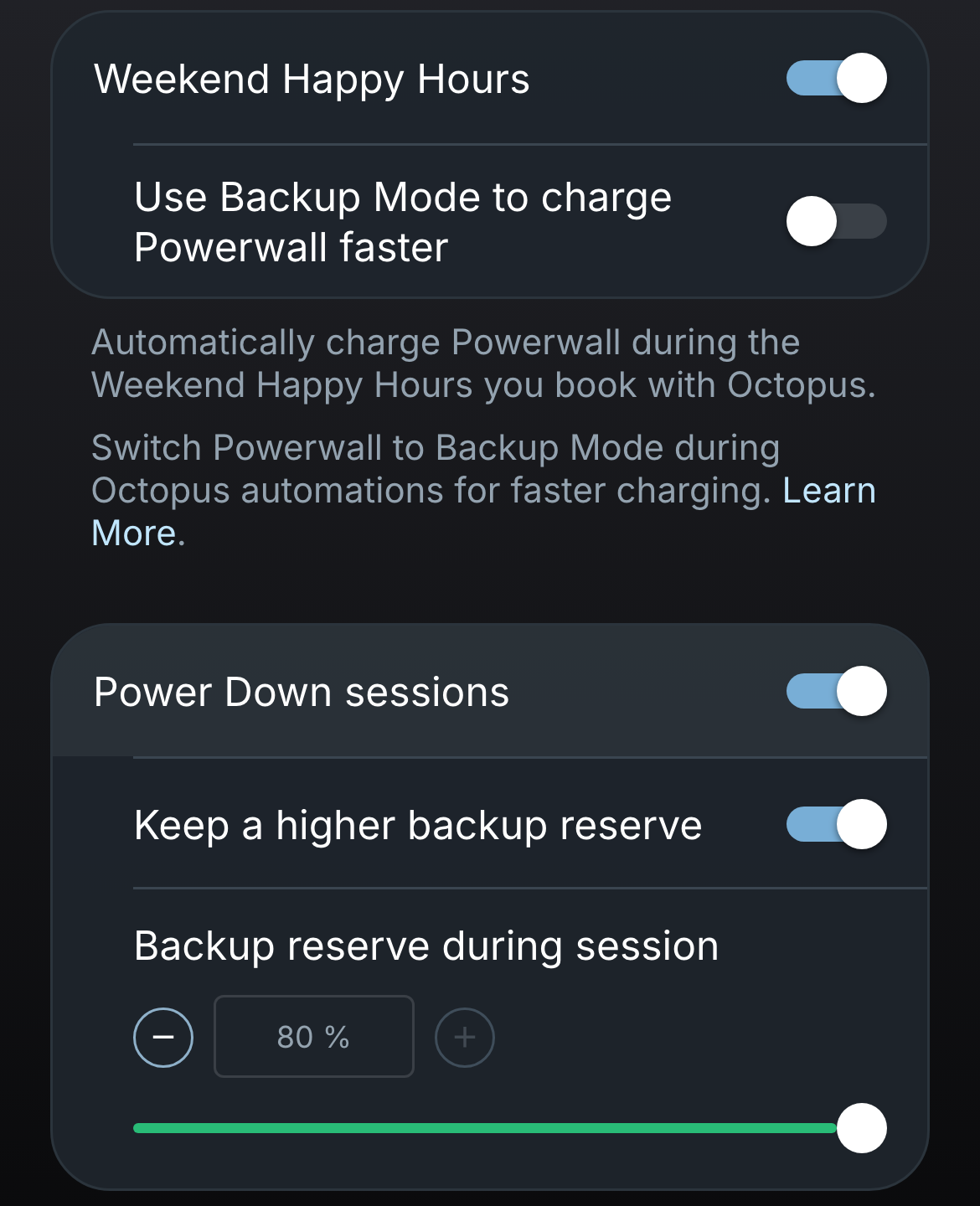
Both options require a Netzero subscription. Power Down sessions is only shown for systems whose grid connection permits exporting stored Powerwall energy (see When grid export is not displayed).
Weekend Happy Hours
Section titled “Weekend Happy Hours”When a Happy Hour you have booked starts, Netzero sets the Powerwall backup reserve to 100%, so the battery charges from the grid for the hour. With Use Backup Mode to charge Powerwall faster enabled, Netzero switches the Powerwall to Backup Mode with grid charging enabled instead, which charges at about 3.3 kW per Powerwall rather than about 1.8 kW.
When the Happy Hour ends, Netzero restores the previous backup reserve, or the previous operational mode and grid charging setting. If you have changed that setting yourself during the Happy Hour, Netzero leaves it as you set it.
Two Happy Hours booked back to back are treated as one two-hour window, so the Powerwall keeps charging between them.
Octopus caps the free electricity at 16 kWh per Happy Hour. Octopus runs Weekend Happy Hours until 14 February 2027.
Power Down sessions
Section titled “Power Down sessions”When a Power Down session you have joined starts, Netzero starts a Powerwall grid export for the rest of the session. Octopus rewards the drop in your net energy use, imports minus exports, compared with your usual use at that time, so exported energy counts toward the reward.
The export works like one started from the Powerwall grid export card:
- The Powerwall switches to Savings mode with energy exports set to Everything (solar and battery), and takes a few minutes to start exporting.
- Exporting stops at the backup reserve, or at the higher reserve described below when that option is enabled.
- When the session ends, Netzero stops the export and restores the previous utility rate plan, operational mode, and energy exports setting.
- The export appears in Automation > Past Runs.
Netzero does not start an export for a Power Down session when:
- Storm Watch is active, since the Powerwall is holding its charge for a possible outage.
- The Powerwall is already at or below the backup reserve, so there is nothing to export.
- A grid export you started yourself is already running.
- Fewer than 15 minutes of the session are left.
Exporting pays off when the Powerwall has charge it would not otherwise use before the next cheap period. Power Down sessions usually fall in the early evening, so a low backup reserve can leave the home importing at peak prices later in the evening.
Higher backup reserve during the session
Section titled “Higher backup reserve during the session”With Keep a higher backup reserve enabled, Netzero raises the backup reserve to the Backup reserve during session value (30% by default, up to 80%) when a Power Down session starts, before the export begins. The export then stops at that level, and the charge left in the Powerwall powers your home for the rest of the evening. You can keep a low everyday reserve without an automation that raises it at a fixed time every day.
- Choose a value above your usual backup reserve. The reserve is only ever raised: if your backup reserve is already at or above the value, Netzero leaves it unchanged. Exporting below your usual reserve would only make the Powerwall charge from the grid back up to it once the session ends.
- Once the export has stopped at the raised reserve, Netzero restores the previous backup reserve, so the Powerwall powers your home for the rest of the session instead of the grid. Otherwise it is restored when the session ends. If you have changed the reserve yourself during the session, Netzero leaves it as you set it.
- If the Powerwall is already at or below the raised reserve when the session starts, or its charge level is not known, Netzero skips the session and leaves the reserve unchanged. A reserve above the charge level would make the Powerwall charge from the grid during the session.
- If the Powerwall has not picked up the raised reserve yet, Netzero checks again, and skips the session only when too little of it is left.
Intelligent Octopus Go and other automations
Section titled “Intelligent Octopus Go and other automations”With the Intelligent Octopus Go integration also enabled, only one of them controls the Powerwall at a time:
- A Happy Hour or Power Down session that starts during a smart charging slot waits for the slot to end, then starts for whatever time is left in the session.
- A smart charging slot that starts during a Happy Hour or a Power Down export waits for the session to end, then the Powerwall follows the slot as usual.
Automations are not paused during a session. An automation that changes the operational mode, backup reserve, or energy exports during a session takes effect immediately, and Netzero then leaves that setting as the automation set it.
- Netzero checks Octopus for joined and booked sessions every few minutes. A Power Down session joined in the last few minutes before it starts may start a few minutes late.
- Octopus Power Up sessions, including local Power-ups offered in some postcodes, are not available from Octopus in a form Netzero can read, so they are not supported. You can set up the Powerwall for a Power Up with two automations that run once, at the start and end of the session.
- Notifications are sent when a session starts and ends, and when a Power Down export could not be started. With a higher reserve during Power Down sessions, they also say when the reserve was raised and restored.